One of the most important things you can’t afford to get wrong is the wiring for your home automation or multiroom system. The guys at The Home Automation Company thought it was about time to offer their expertise in our home automation wiring guide.

The right tools for the job
First and foremost is making sure you have the right tools for the job, the number one problem that occurs later on is due to poorly terminated cables. Getting something as simple as one RJ45 plug badly crimped can become a nightmare when trying to solve system issues.
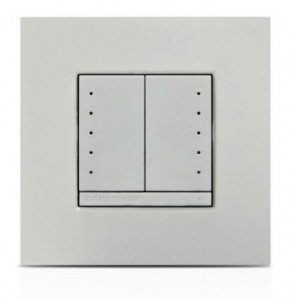
The basics of your tool kit should at least start with your normal sparky style tools, screwdrivers! Make sure you have a good set and particularly at the small end of the screwdriver scale, a number of multiroom products use tiny screws to hold cabling in place or terminating keypads so a good quality, yet small flat blade screwdriver will become your best friend.
Next, a perfect tool to save time is the wire stripper, again don’t scrimp on quality on this, trying to hack a cable 5 or 6 times because the first attempt didn’t work will not do your cabling any good, but the right one will shave hours off your installation time.
Another best friend for your tool kit is the crimper, RJ45 crimpers are used in order to crimp the plastic RJ45 plug on to the end of a cat5e or cat6 cable, again this toll is not something you can afford to scrimp on quality, an inferior crimp tool with have you guessing why a wall panel won’t come on, or a remote control signal just won’t work through the system, chances are one of the strands has not been fully crimped in the plug and resulting in sorts of system errors.
For those who wish to make life that little bit easier, the EZ-RJ45 range is perfect for the crimping novice, making light work of any RJ45 plug connections, helps you line up your cable strands in the right order and offers a quick yet perfect finish.
The Cables
What to do when it comes to cabling a home automation system can be a mind field, with so much contradicting advise out there, we though it would be easier to come down to the basics, and detail the very minimum you can expect to need for a multiroom system, obviously there are often very specific cabling requirements for some solutions, so always speak with someone in the know first, (don’t forget, all our multiroom packages come bundled with complete wiring diagrams based on your project, your home and the future).
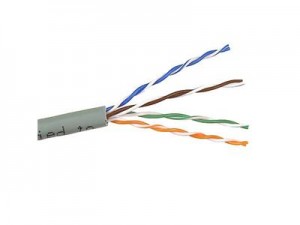
Cat5e Cabling
Most systems on the market today work perfectly on cat5e and you will find this is probably the most common cable you will end up using, now although often cheap to buy, we advise to not get the cheapest! Some of the real cheaper cable out there will often be too brittle or too soft to work with and will have you pulling your hair out trying to get the cable to crimp.
Cat5e and other multi-strand cables come in two types, UTP (unshielded) and FTP or STP (shielded). The main differences between these two types apart from obviously one being shielded and one not, is where they are used. Unshielded cable is commonly used for wall keypads, data and interconnecting cabling, where the shielded version is used where video signaling is typically used, as this prevents any interference being picked up along the cables length which will cause all sorts of issue on picture quality or interference being picked up from heating systems etc.
The golden rule with any cabling installation for a home automation system is to never run parallel with mains power cables, only cross at 90 degrees if you have too and keep a minimum of 4 inchs away form anything that could generate static noise, like pipes, power-lines etc
Cat6, Cat7, cat8, cat9, cat287657
When and where to use cat6 or higher is often determines by the system you use, Cat6 carries a much higher bandwidth, so on some application it can be easier to run signaling down single cat6 cables instead of twin cat5e, but the industry is often changing, cat6 and higher has come about due to the networking industry as broadband becomes faster and more computers are added to networks, then a high bandwidth is needed, although not crucial in AV system, its worth double checking on the system requirements first.
COAX, CT100 & WT100
Back in the days of conventional aerial systems, Coax of course became the norm, and its still used today in some circumstances as we still rely upon Coax cabling to carry standard TV signaling across our homes. The minimum you need to be looking for is often referred to at CT100 or High Grade Coax, as Coaxial cable is prone to picking up noise from other sources of the house, this extra quality of shielding will help prevent poor picture quality and/or loss of signal
For the perfect coax cable option though, the WF100 cable is becoming popular in the multiroom industry, where CT100 uses as much air as possible to keep the outer core away from the inner core (air being a much better insulator then plastic) the disadvantage is you now have a series of tubes running around the cable which can fill with water and the cable can be prone to kinks, the WF100 cable uses foam filled insulating, so no chance of water intake or horrible cable kinks.
For the perfect answer to any home automation wiring installation check out our First Fix Wiring Pack